
Instagram is more than a place to share photos and videos. For businesses, it can also be a powerful channel for showcasing products and encouraging customers to buy.
A shoppable Instagram feed brings that experience directly to your website. Instead of simply displaying Instagram content, you can connect posts with relevant product pages and give visitors an easier path from discovering a product to making a purchase.
With Easy Social Feed, WordPress website owners can create an engaging Instagram feed and turn visual content into a more useful part of the shopping experience.

 www.google.com.pk
 Drones overall will be more impactful than I think people recognize, in positive ways to help society. ~ Bill Gates…
 When everything seems to be going against you, remember that the airplane takes off against the wind, not with it.…

 We fly to 106 kilometers. We've always had as our mission that we always wanted to fly above the Karman…

 +6 more
 The earth belongs to the living, not to the dead. - Thomas Jefferson #space #nasa #art #universe #astronomy #science #galaxy…
 😍😍❤️❤️ #nature #skyline #clouds
What Is a Shoppable Instagram Feed?
A shoppable Instagram feed is an Instagram feed embedded on a website where posts can be connected to products or shopping destinations.
A regular Instagram feed primarily displays your latest social content. A shoppable feed takes this further by helping visitors move from an Instagram post to the product associated with it.
For example, imagine a clothing brand displays an Instagram post featuring a jacket. Instead of visitors seeing the image and then manually searching the website for that jacket, the shoppable feed can provide a direct path to the relevant product.
This creates a smoother journey:
See the post → Discover the product → Visit the product page → Purchase
It combines social content, product discovery, and website shopping in one experience.
Why Add a Shoppable Instagram Feed to Your Website?
Instagram content is naturally visual, which makes it particularly useful for brands selling products that customers want to see before purchasing.
Embedding that content on your website can also help you get more value from posts you have already created.
1. Turn Instagram Content Into Product Discovery
Your Instagram posts don’t have to remain limited to Instagram.
By displaying them on your website, you can use existing photos, videos, and product-focused content to help visitors discover what you sell.
A shoppable Instagram feed for WordPress makes the content more actionable by connecting the visual experience with your products.
2. Create a More Visual Shopping Experience
Traditional product grids are useful, but social content can show products in a different context.
Visitors might see clothing being worn, furniture inside a real room, beauty products being used, or accessories styled together.
This gives customers another way to explore your products without replacing your normal product pages.
3. Reduce Steps Between Discovery and Purchase
Every unnecessary step can make the shopping journey more complicated.
If someone sees a product they like in an Instagram post, they shouldn’t have to browse several categories or search your entire website to find it.
A shoppable feed can provide a more direct route to the relevant product or page.
4. Keep Your Website Visually Fresh
Creating new website content constantly takes time.
An Instagram feed allows you to bring your social content onto your WordPress site and keep important pages visually engaging.
As your Instagram content changes, your website feed can continue showcasing recent content without requiring you to manually recreate every social post as website content.
5. Connect Social Media With Your Website
Social media and your website shouldn’t operate as completely separate channels.
Your Instagram account may be where customers discover your brand, while your website is where they learn more about products and complete purchases.
Embedding a shoppable feed helps connect these two experiences.
How Does a Shoppable Instagram Feed Work?
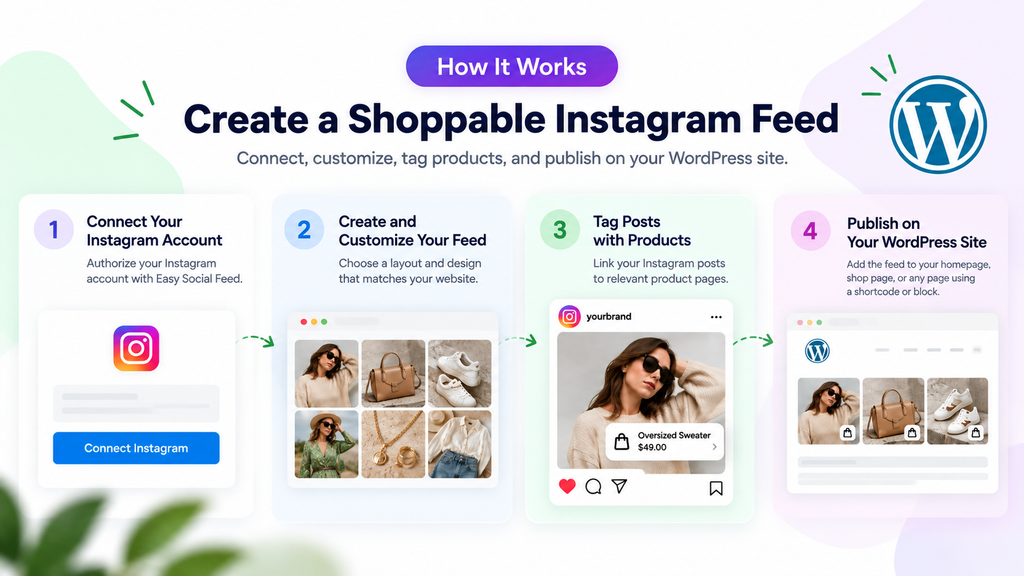
The concept is straightforward.
First, you connect your Instagram account to your WordPress website using a social feed plugin such as Easy Social Feed.
You can then create and customize an Instagram feed that matches your website design.
For shoppable content, relevant Instagram posts can be associated with shopping links or products. When visitors interact with those posts, they can access the related destination instead of simply viewing the Instagram content.
The result is an Instagram gallery that becomes part of your website’s product-discovery experience.
Where Should You Display a Shoppable Instagram Feed?
Placement matters. A shoppable feed should appear where it supports the visitor’s journey rather than distracting from it.
Homepage
Adding an Instagram section to your homepage can introduce visitors to products through visual content while also showing your brand’s social presence.
Product Pages
Relevant Instagram posts can complement traditional product photography and provide additional visual context.
Shop Pages
A shoppable feed can give customers an alternative way to browse products based on social content rather than categories alone.
Landing Pages
If you’re running a promotion or campaign, related Instagram posts can support the landing page and direct visitors toward featured products.
Dedicated Instagram Shop Page
You can also create a separate page specifically for your shoppable Instagram feed.
This provides visitors with a visual storefront where they can browse Instagram content and discover related products.
How to Add a Shoppable Instagram Feed to WordPress
You don’t need to manually build an Instagram integration from scratch.
With Easy Social Feed, you can add and customize an Instagram feed directly from WordPress.
Step 1: Install Easy Social Feed
Install and activate the Easy Social Feed plugin on your WordPress website.
Once activated, you can access the plugin settings from your WordPress dashboard.
Step 2: Connect Your Instagram Account
Connect the Instagram account containing the content you want to display.
After authorization, the plugin can retrieve the Instagram content required for your website feed.
Step 3: Create Your Instagram Feed
Create a new feed and select the content you want to display.
Choose a layout that works well with your website and the type of products you’re showcasing.
Step 4: Customize the Feed
Your social feed should feel like part of your website rather than a completely separate element.
Customize the layout and appearance so that it works naturally with your existing branding and page design.
Step 5: Make Instagram Posts Shoppable
Connect relevant posts with their corresponding shopping destinations.
For example, if an Instagram image features a particular product, you can provide visitors with a direct route from that post to the relevant product page.
Step 6: Publish the Feed
Once your feed is ready, add it to the appropriate WordPress page.
Depending on your strategy, this could be your homepage, shop, landing page, product-related page, or a dedicated Instagram shopping page.
Tips for Creating a Better Shoppable Instagram Feed
Simply embedding Instagram posts isn’t enough. The feed should make product discovery easier while still looking natural on your website.
Use high-quality images that clearly show your products. Link each shoppable post to the most relevant destination instead of sending every visitor to the same generic shop page.
Keep the layout clean and responsive so the feed remains easy to browse on desktop, tablet, and mobile devices.
It’s also worth placing the feed where visitors already have some shopping intent. A visually attractive Instagram gallery can work particularly well near product collections, featured items, or other commerce-focused sections.
Most importantly, avoid overcrowding the page. Your Instagram feed should support your existing website experience rather than compete with it.
Shoppable Instagram Feed vs. Regular Instagram Feed
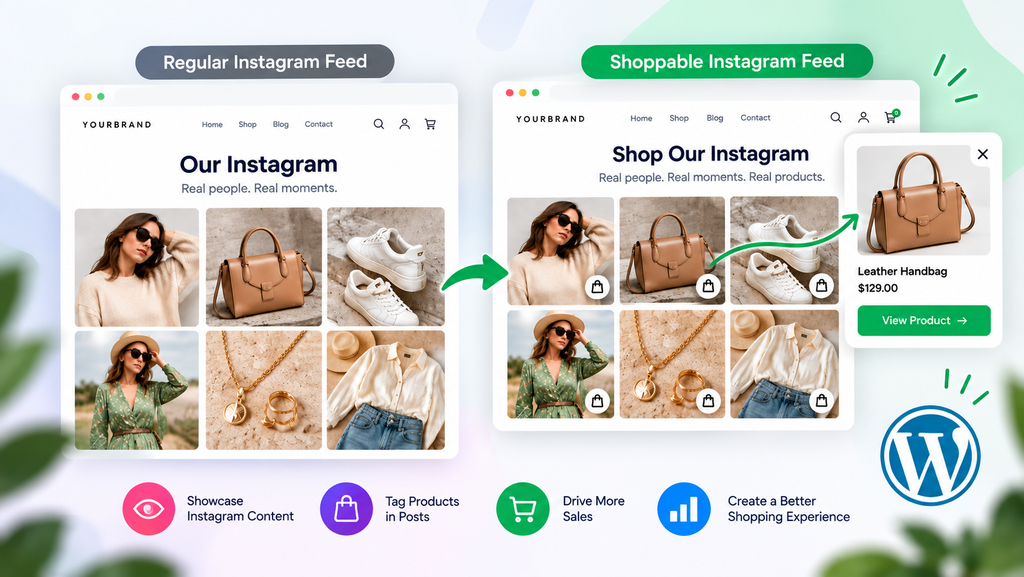
The main difference is what happens after someone discovers something they like.
A regular Instagram feed is primarily designed to display social content on your website. Visitors can browse your posts and see what’s happening on your Instagram account.
A shoppable Instagram feed adds a commerce layer to that experience. It gives relevant posts a clearer connection to products or shopping destinations.
For ecommerce websites, this can make Instagram content more useful throughout the customer journey.
Who Can Benefit From Shoppable Instagram Feeds?
Shoppable feeds can work particularly well for visually driven businesses, including:
- Fashion and apparel stores
- Beauty and skincare brands
- Jewelry and accessory stores
- Home décor businesses
- Fitness brands
- Food and lifestyle businesses
- Artists and creators
- WooCommerce stores
- Online retailers
If customers benefit from seeing your products in real-world or visually appealing settings, Instagram content can become an effective extension of your website.
Turn Your Instagram Feed Into a Shopping Experience
Your Instagram posts already help people discover your products. Bringing those posts onto your website can help connect that discovery with the place where customers actually shop.
With a shoppable Instagram feed, you can transform social content from a simple website gallery into a more interactive product-discovery experience.
Easy Social Feed makes it easier to display Instagram content on WordPress, customize how your feed looks, and create a social experience that fits naturally into your website.
Instead of letting your best Instagram content live only on social media, bring it to your website and make it part of the customer journey.
Ready to create your shoppable Instagram feed? Explore Easy Social Feed and start turning Instagram content into an engaging shopping experience on your WordPress website.